
Merchants Bank Rupay Debit Card / ATM Cards
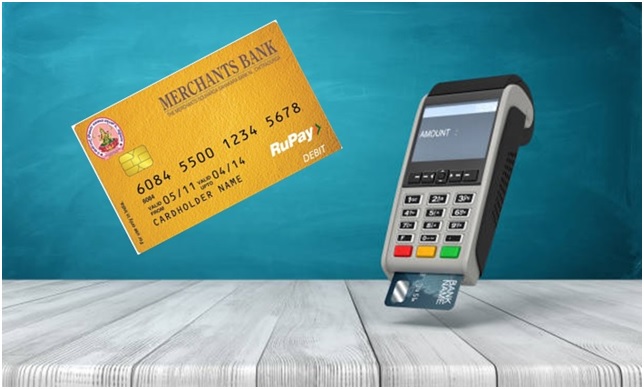
We are pleased to Offer you to the Modern Banking Services of The Merchants Souharda Sahakara Bank Niyamitha., Chitradurga offer you RuPay Debit Card in your name!
The RuPay Debit Card, as the name suggests, will provide you access not only to Merchants Bank Chitradurga., ATMs but also other banks’ ATMs and Merchant Establishments across India that display the RuPay logo. You can use your card to withdraw money (limited to daily withdrawal limit) from your account anytime, anywhere at your convenience. You can also check Account Balance, change PIN and print a Mini Statement. Kindly read the User Guide and the Terms & Conditions carefully before using the card.
RTGS / NEFT

RTGS
Real Time Gross Settlement. This is a system where the processing of funds transfer instructions takes place at the time they are received (real time). Also the settlement of funds transfer instructions occurs individually on an instruction by instruction basis (gross settlement). RTGS is the fastest possible interbank money transfer facility available through secure banking channels in India.
Benefits
RTGS is the fastest possible interbank money transfer facility available through secure banking channels in India.
- Transfers in real-time.
- Faster clearing house settlement issues.
NEFT
NEFT – National Electronic Fund Transfer – This system of fund transfer operates on a Deferred Net Settlement basis. Fund transfer transactions are settled in batches as opposed to the continuous, individual settlement in RTGS. Presently,
Benefits
- Handle Credit card payments from home.
- Faster because no demand drafts, cheques or letters.
What is NEFT Funds Transfer?
A nation- wide funds transfer system, supporting the transfer of funds from any bank branch to any other bank branch.
Mobile Banking

Merchants Bank, Chitradurga brings you Mobile Banking through the Immediate Payment Services, a service that enables you to transfer money from one bank to another bank instantly. What’s more, this service is available 24 X 7 and 365 days a year with no holidays.
Pre-Requisites for Mobile Banking through IMPS
Merchants Bank CTA Mobile Application Screenshot
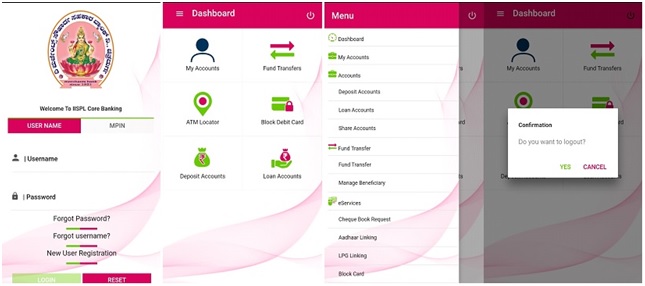
Registration for Remitter:
1.Register yourself with the mobile banking service of the bank.
2.Get Mobile Money Identifier (MMID) and MPIN from the bank
3.Download Software (Application) for mobile banking (ensure the compatibility of mobile with the application) or use the SMS facility in your mobile.
Registration for Beneficiary (To Receive Money):
1.Link your mobile number to the account in the respective bank.
2.Get 7 digits Mobile Money Identifier (MMID) from the bank
3.Share your mobile number and MMID with the remitter
4.Ask the remitter to send money using your mobile number and MMID
5.Check the confirmation SMS for credit to your account of the remitter
For Remitter (To send money):
1.Login to the application and select the IMPS menu from the IMPS or use the SMS facility in your mobile if your bank provides IMPS on SMS
2.Get Beneficiary Mobile number and MMID
3.Enter Beneficiary Mobile number, beneficiary MMID, Amount and your MPIN to send
4.Await confirmation SMS for the debit in your account and credit in beneficiary account
5.Note the transaction reference number for any future query
6.Share your Mobile number and MMID with the remitter
7.Ask the remitter to send money using your Mobile number and MMID
8.Check the confirmation SMS for credit to your account from the remitter
9.Note the transaction reference number for any future query
Services through Mobile Banking
Utility Bills Payments through Merchants Bank CTA Mobile Banking
1.ViewStatement
2.Check Book Request
3.IMPS fund Transfer (Inter & Intra bank) with Separate Limits for inter and intra bank at account level as well
4.Transaction History
5.Beneficiary management
6.Account Management
7.Transaction Enquiry
8.Cheque book & Statement Request
Note:
IMPS
IMPS offer an instant, 24X7, interbank electronic fund transfer service through mobile phones. IMPS is an emphatic tool to transfer money instantly within banks across India through mobile, internet and ATM which is not only safe but also economical both in financial and non-financial perspectives.
This facility is provided by NPCI through its existing NFS switch.
Pre-Requisites for Mobile Banking through IMPS
Registration for Remitter:
- Register yourself with the mobile banking service of the bank.
- Get Mobile Money Identifier (MMID) and MPIN from the bank.
- Download Software (Application) for mobile banking (ensure the compatibility of mobile with the application) or use the SMS facility in your mobile if your bank provides IMPS on SMS.
Registration for Beneficiary
- Link your mobile number to the account in the respective bank.
- Get Mobile Money Identifier (MMID) from the bank
For Remitter (To send money):
- Login to the application and select the IMPS menu from the IMPS or use the SMS facility in your mobile if your bank provides IMPS on SMS.
- Get Beneficiary Mobile number and MMID
- Enter Beneficiary Mobile number, beneficiary MMID, Amount and your MPIN to send.
- Await confirmation SMS for the debit in your account and credit in beneficiary account.
- Note the transaction reference number for any future query.
For Receiver (To Receive money):
- Share your Mobile number and MMID with the remitter.
- Ask the remitter to send money using your Mobile number and MMID.
- Check the confirmation SMS for credit to your account from the remitter.
- Note the transaction reference number for any future query.
UPI Payments

Unified Payment Interface (UPI)
Discover a quick and easy way to send and receive money using a Virtual Payment Address (VPA), Mobile No without entering additional bank information.
Unified Payments Interface (UPI) is a system that powers multiple bank accounts into a single mobile application (of any participating bank), merging several banking features, seamless fund routing & merchant payments into one hood. It also caters to the “Peer to Peer” collect request which can be scheduled and paid as per requirement and convenience.
As of now 147 banks are live on UPI including our Bank along with third party apps.
- How is it unique?
Immediate money transfer through mobile device round the clock 24*7 and 365 days. - Single mobile application for accessing different bank accounts.
- Single Click 2 Factor Authentication – Aligned with the Regulatory guidelines, yet provides for a very strong feature of seamless single click payment.
- Virtual address of the customer for Pull & Push provides for incremental security with the customer not required to enter the details such as Card no, Account number; IFSC etc.
- Bill Sharing with friends.
- Best answer to Cash on Delivery hassle, running to an ATM or rendering exact amount.
- Merchant Payment with Single Application or In-App Payments.
- Utility Bill Payments, Over the Counter Payments, Barcode (Scan and Pay) based payments.
- Donations, Collections, Disbursements Scalable.
- Raising Complaint from Mobile App directly.
- View Profile
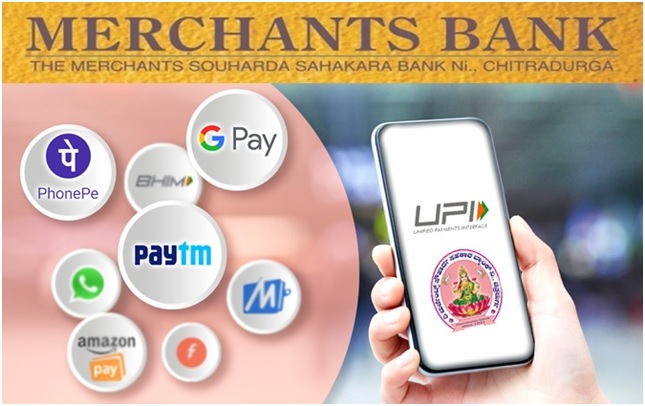
Now Merchants Bank available on various UPI apps.
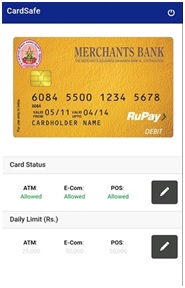
Card Safe Security App

Our Bank is exploring all the possibilities of digitalization in day to day banking. Recently the Bank has implemented new service CardSafe Card Security App for our customers
CardSafe is a minimalistic mobile app.The official app of the bank available on Google Play Store, Apple App Store, Microsoft Store for ensuring the security of a bank customer’s debit card. Using the app, the customers can:
•Block/Unblock Debit Cards
Block/Deactivate and Unblock/Activate their Debit Cards anytime at will.
•Set Daily Transaction Limits
Set the Daily Transaction Limits for ATMs, E-Com, and POS terminals for each card.
Customer benefits
•Safety, Maximum Time
Customer can activate a card just before doing a transaction and block the card as soon as done. Protects the card against misuse during its idle time.
•Control and Self-Discipline
Customer can set the transaction limit to any amount below the maximum limit specified by the issuer bank. This inculcates financial self-discipline.
•Emergency Self-Help
Customer can block a lost or stolen card instantly, without having to go through the tedious process of calling the bank’s customer care number.
The process and procedure for Card Safe service is as under.
Helps the customers to secure their RuPay ATM/Debit card usage whereby users can set
1.Switch their ATM card On or Off on various channels ATM withdrawal/POS/Ecommerce.
2.Fix daily limits for ATM/POS/Ecommerce transactions.
The above services will be helpful to the customer to ensure the safety of the card operation and secured transactions preventing unauthorized usage of the card by third party.
These services may be availed at the convenience of the customer with all security to their cards.
How to make RuPay ATM/Debit card more secure
1.Download Sarvatra Card safe, the official Android app of the bank available on Google Play Store.
2.Install it on your mobile
3.Start registering and setting MPIN for the App with registered mobile number.
4.You will receive a high security OTP on your registered mobile number. Enter it and click on ‘submit’. After successful registration again log in with MPIN
How to switch off/on RuPay ATM/Debit card for financial transactions on ATM/POS/Ecommerce channels
1.Log into Sarvatra Cardsafe you will see Merchants Bank RuPay Debit card with masked card no and name on screen.
2.Click on card for which you want to avail these services (If you have more than one card, then select the card for which you want to avail these services by swiping right) After you select the card, you will be able to see all the card service channels.
3.Go to Card status, and click on “Edit icon option”
4.Select channel to which you want to on/Off the RuPay ATM/Debit card and make on/Off and click on confirm.
5.After submitting, you will see a message that says: “ATM/POS/Ecom “Status updated”.
Note: If the ATM status updated as Off, you are not able to do transaction till you make status as On. Same is applicable to other channels too.
How to set daily transaction limit of RuPay ATM/Debit card on ATM/POS/Ecommerce channels
1. Click on card for which you want to avail these services (If you have more than one card, then select the card for which you want to avail these services by swiping right) then select the account for which you want these services. After you select the card, you will be able to see all the card service channels.
2. Go to Daily limit, and click on “Edit icon option”
3. Select channel to which you want to set the daily limit and set the amount and Click on confirm.
4. After submitting, you will see a message that says: “ATM/POS/Ecom limit updated”.
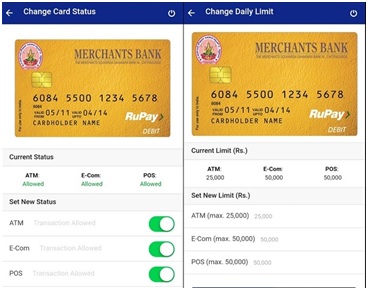
Note: If the ATM limit set as Rs 5000, the limit of your ATM card is Rs 5,000. You can withdraw this amount from your ATM card on a given day limiting to Rs 5,000. Same is applicable to other channels too.
FASTAG Service

To reduce vehicular traffic at the toll plazas, the Government of India (GOI) has mandated all toll plazas, pan India, to make toll payments electronic. With this mandate, all vehicles travelling through toll plazas will have to mandatorily pay toll charges using FASTag.
About us
FASTag is a simple to use, reloadable tag which enables automatic deduction of toll charges and lets you pass through the toll plaza without stopping for the cash transaction. FASTag is linked to a prepaid account from which the applicable toll amount is deducted. The tag employs Radio-frequency Identification (RFID) technology and is affixed on the vehicle’s windscreen after the tag account is active.
FASTag is a perfect solution for a hassle-free trip on national highways. FASTag is presently operational at 407 toll plazas across national and state highways. More toll plazas will be brought under the FASTag program in the future.

National Electronic Toll Collection
National Electronic Toll Collection (NETC) initiative rolled out by NPCI under the guidelines of NHAI and IHMCL.
FASTags are issued in co-ordination with IDBI Bank Ltd
Customer can avail FASTag just by visiting our Head Office and get FASTag within 20 minutes.
SMS Alert
Better Tracking Receive instant SMS alerts on transaction made in your accounts.
Charges for SMS Service – Half Yearly 15+Gst
Missed Call Banking
CTS Clearing
Information Updated Shortly
